
Structural Differences and Practical Applications
Maps used in design and publishing can be created in either vector or raster formats. Although both represent geographic information visually, their internal structures, editing capabilities, and performance characteristics differ significantly. Understanding these differences is essential when selecting map data for professional workflows.
This article explains how vector and raster maps differ and why vector formats are preferred in design-oriented cartographic production.
What Is a Raster Map
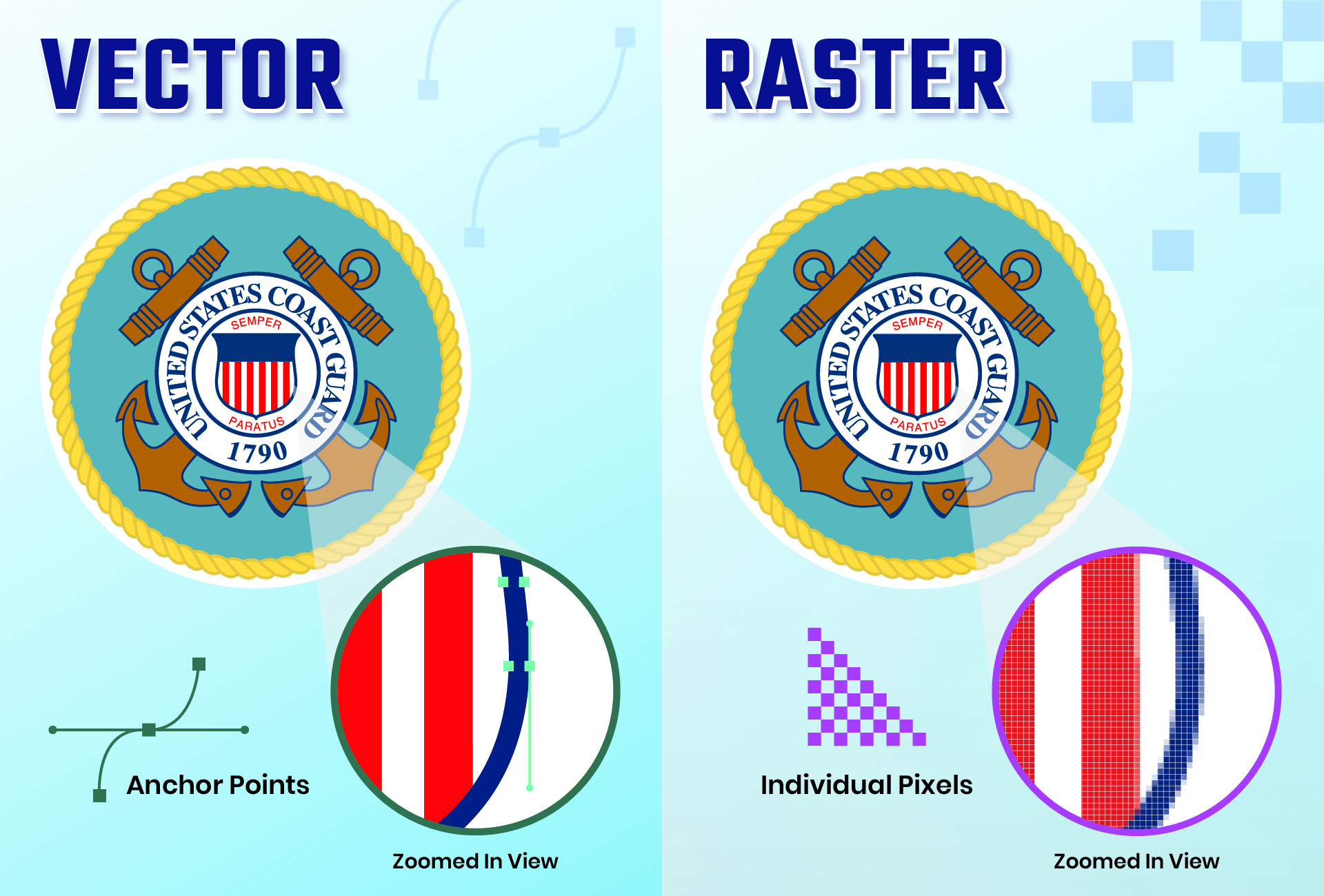
Difference Vector and Raster
Raster maps are composed of pixels arranged in a grid. Each pixel has a color value, and the map is essentially an image.
Characteristics:
-
resolution-dependent
-
not scalable without quality loss
-
fixed visual representation
-
limited editing at object level
Raster maps are commonly used for:
-
satellite imagery
-
scanned maps
-
shaded relief backgrounds
What Is a Vector Map
Vector maps are built from geometric objects:
-
points
-
lines (polylines)
-
polygons
Each object is mathematically defined rather than pixel-based.
Characteristics:
-
resolution-independent
-
infinitely scalable
-
fully editable objects
-
structured layers
Vector maps are used in:
-
graphic design
-
publishing
-
cartographic visualization
-
technical drawing workflows
Scalability
Raster maps lose clarity when enlarged because pixels become visible. Vector maps retain sharpness at any scale because geometry is recalculated mathematically.
This is crucial for:
-
large-format printing
-
posters and billboards
-
multi-scale layouts
Editing Capabilities
Raster editing is pixel-based. Modifying individual map features is difficult without image manipulation.
Vector maps allow:
-
editing individual roads
-
adjusting boundaries
-
removing or adding features
-
changing styling per object
This flexibility makes vector maps suitable for design projects.
File Structure and Performance
Raster maps may have large file sizes at high resolution, but structure remains simple.
Vector maps can contain millions of segments, requiring careful optimization. However, their layered structure allows selective editing and visibility control.
Layer Control
Raster maps typically contain flattened information.
Vector maps provide:
-
feature-based layers
-
hierarchical organization
-
selective styling
Layer structure supports complex design workflows.
Printing Considerations
Raster maps require resolution matching the final print size. Insufficient resolution leads to blurred output.
Vector maps adapt to any output resolution, ensuring sharp lines and text at all sizes.
Combining Vector and Raster
Professional cartography often combines both:
-
vector data for structure and symbols
-
raster imagery for terrain or background
This hybrid approach supports both precision and realism.
Summary
Raster maps represent geographic information as images, while vector maps store structured geometric data. Vector maps provide scalability, editability, and layered control, making them the preferred format for design and publishing workflows. Raster maps serve complementary roles but lack the structural flexibility of vector cartographic datasets.
 Author: Kirill Shrayber, Ph.D. FRGS